Blog Archives
Game Design For Cub Scouts
 A friend whose older son was in one of my sons’ Boy Scout troop asked me to attend her younger son’s final Cub Scout meeting and talk about game design. Now, I teach game design every day to college-age students, and I have a lot of experience running game design merit badge workshops for boy scouts (in fact, I’m one of creators of the Boy Scouts Game Design Merit Badge). However, this opportunity presented a different set of challenges. For one thing, I had only about an hour. And for another, we’re talking about ten-year-old boys, and that means barely-contained bundles of energy.
Okay, I needed a game plan. To keep their energy focused into a productive hour, I needed to keep my talk fast-moving and keep the boys active. So, here’s what I did.
After giving the briefest of introductions about my background (Disney, Activision, Spinmaster toy company), I asked them what their favorite game was? “Minecraft!” Of course. “Angry Birds!” “LEGO Marvel Super Heroes!” “Portal 2!” Now, those are all great video games, but what about other times of games? What’s your favorite board game? “Monopoly!” “Life!” “Risk!” What about sports? Those are games too. “Baseball!” “Football!!” What about party games? “Pin The Tail On The Donkey!” “Tag!”
Well, is every activity a game? Is homework a game? “NO!” Is taking the trash out a game? “NO!” So what does an activity need to be a game? “Fun! It has to be fun!” Right you are! Fun is an essential element of a game. But throwing rocks across a pond can be fun. Does that make it a game. “It can be, if you try to make it skip three times!” Oh, so the activity needs to both be fun and have a goal. Anything else? “Rules! It has to have rules!” (This kids are smarter than my college students!)
Maybe we can turn any activity into a game. How about painting? Is painting fun? “Yes!” Is there a way to give it a goal? “Maybe someone has to paint something!” “Maybe it’s two people!” Okay, here’s the goal: there are two painters, and we give them a word or phrase to paint. And the first person to paint it correctly wins. What other rules can we give to them? “People have to guess what they are drawing!” “They take turns!” “They have to do it in a time limit!” Congratulations! You Cub Scouts have invented the game Pictionary!
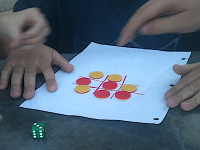 Enough talking! Let’s play some games! Let’s play one of my favorite games of all time — Tic Tac Toe! (I begin pulling papers, marking pens, dice, and colored discs — one side red, the flip side yellow — out of my supply box). Now, I’m a little fuzzy on the rules. Tell me, how do we start the game? Very quickly the cub scouts assemble the following How To Get Started Rules:
- Draw a 3×3 grid
- Choose 2 people to play
- Each person picks a color
- Roll the dice to see who goes first.
So, how do we get from the game start to game finish? “We take turns!” And what do we do each turn? “You put your color down in a square!” Any square? “An empty square!”
And how does the game end? “You win by getting three in a row!” Is that the only way the game ends? “No, you can get a cat’s game where no one wins” Well, I think that’s everything we need to know to play. So, let’s break up into groups of two and play the game.
After a couple of minutes, I tell them to stop. I re-arrange them into groups of three, with one person appointed to be game designer. I explain to them that the job of a game designer to create fun experiences for other people. It’s like being the host of a party: you decide what decorations there will be, what food to serve, what music to play, what activities to do, and when your friends arrive, you need to make sure that they are having a good time. But different people like different things, and so it’s hard to guess what will be fun for them. So, you have to watch them, and if they aren’t having a good time, you have to switch things up.
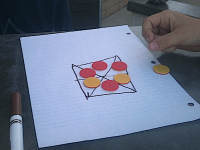 And so, I had each “game designer” propose one change to the rules that he thought would make the game more fun, as well as what his prediction would be about how the players would react to the rule change. The “designer” then watched the other two scouts play the game with that rule change, and then tell me his observations afterwards. Then I let another scout be the game designer until each scout had a chance. Most of them simply added more squares to the grid, but one scout made a very intriguing circular grid unlike anything someone has suggested before when I’ve done this exercise with students.
After everyone had their turn, I explained that even video game designers may first play their games on pen and paper before it goes to programming, because its so easy to make changes to pen-and-paper games. You can even play a first-person shooter game as a pen-and-paper game! And with that, I pulled hexagonal graph paper, sticky notes, cards, tokens, and discs out of my supply box, and described the rules for a “paintball” game (I winked at the scouts’ parents as I said this, since I knew that would be the only acceptable way I could present a first-person shooter to young kids) based on a game described in Tracy Fullerton’s book Game Designers Workshop.
Getting Started
- Use hex paper as the floor of a room
- Use sticky notes as walls
- Each player uses a colored disc as their avatar and draws an arrow on it to show shooting direction
- Each player colors one hex as their starting location and places their avatar on it.
- Each player takes 3 tokens to represent their “lives”
- Each player takes a deck of 9 cards: 3 “turn” cards, 3 “move cards”, and 3 “shoot” cards.
Gameplay
- The game is played in turns. During each turn, each player chooses 3 cards from their deck of 9 cards, indicating the actions that they want to take in each round in the turn.
- Each turn consists of 3 rounds. Players take the action for the card corresponding to that round, in the following order:
- Shoot: Any other player that the arrow on the player’s disc is currently point is hit, unless a wall blocks the short. The hit player loses a life: if he loses all three lives, he is removed from the game, otherwise, he returns to his starting point.
- Turn: The player rotates his avatar disc so that its arrow points one hex side to the left or right of its current direction.
- Move: The player moves his avatar disc one hex over from his current position, in any direction.
Game End
- The game ends when only one player remains alive.
 I was worried at first that the rules would be too complex for ten-year-olds, but my worries were unfounded, as I had underestimated the kids. They picked up the rules quickly, and the natural leader on each team wound up calling out rounds and actions. As the meeting time drew to a close, one game had been one and another was close to winning.
There was a moment or two when scout’s tempered flared because they weren’t happy with how things were going, or their excitement was almost not containable, but I kept things moving quickly enough that I was able to redirect their attention.
All in all it, the experience went as well as I could have hoped. The scouts seemed to have a fun time, the parents were pleased, and I got a blog topic out of it. I’d happily do it again some time. I’m available for future cub scout meetings, birthday parties, and bar mitzvahs.
Balboa Oaks Merit Badge Midway Produces Several Fun Games!
 Several times each year I run a Game Design Workshop at a nearby Boy Scout merit badge midway. One of the best managed of these events is the Balboa Oaks Merit Badge Midway, which requires scouts to preregister a couple of months in advance. This gives scouts time to fulfill a workshop’s prerequisites and take full advantage of their time with the merit badge counsellor. This is especially helpful to me when I run a workshop, because it allows scouts to come up with a game idea and create a prototype that they can bring into my workshop for playtesting.
I ran a Game Design Workshop at the Balboa Oaks Merit Badge Midway last Saturday, and I’d like to share some of the games that the scouts designed and brought to playtest.
Basketball Boardgame
 Daniel L. of Troop 316 designed a two-player basketball boardgame in which the player who scores ten points first wins.
At the beginning of the game the two players start out at opposite sides of the board. The two players flip a coin to decide who goes first. Then the starting player rolls a die and decides to go left, right, or forward. If a player rolls doubles, he draws a card out of a deck with fouls, blocks, and steals. With a flagrant foul, the player loses a turn; with a shooting foul, the other player gets two shots from the free throw line; with a personal foul,the opponent starts from the three point line; and with a offensive foul, the player loses a turn. If a player draws a steal card, the opponent loses a turn. If the player draws a block card, the opponent moves back to half court. The player’s main goal is to score some points by throwing a marble sized ball into a small basketball hoop.
Everyone who tested the game enjoyed it but found it a bit too easy at first. The designer’s solution was to require players to be closer to the net before making a throw.
Sonic Hedgehog
 Zachary L. of Troop 243 designed a multiplayer-player boardgame based on the videogame character Sonic the Hedgehog. In this game, players race around the board collecting 7 differently-colored emeralds as well as the final, single eighth emerald before going to the finish.
Players take turns rolling dice to move around the board. Certain paths lead to a treasure trove of same-colored emeralds, and the player entering the space can retrieve one of these. Landing in other spaces require the player to pick up Sonic Cards, which may direct the player to move to other locations, give up an emerald to another player, or take an emerald. In the final treasure trove, there is only one, eighth emerald.
While players enjoyed the homage to Sonic The Hedgehog, they wanted more challenge to the game. In response to this feedback, the designer added more cards that required players to move back along the path.
Card and Dice Game
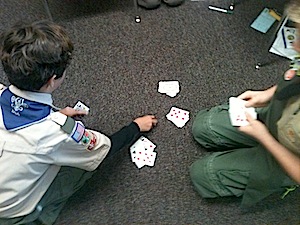 Logan K. of Troop 604 designed a multi-player card and dice game in which the objective was to get rid of all of your cards.
With two players, each player gets 10 cards. With three or more players, 7 cards are dealt. Players roll two dice to see who goes first, and the player with the highest number starts the game. The first player rolls the dice and based on the numbers rolled, decides which cards to discard. (For example, a player who rolls a 2 and a 5 can either discard all of his 2’s or all of his 5’s, or a 2 and a 5, or a 7. If a player cannot discard, he must draw a card from the pile and play passes to the left.) The first person to get rid of all his cards wins!
All of the playtesters loved playing this game. The designer tried a couple of rule variations, but ultimately stuck with the original rules.
The Exploration Game
 Ian B. of Troop 642 designed a multi-player board game in which the objective was to get to the finish while learning facts about famous explorers.
Players roll dice to determine the order in which they will take turns. During each player’s turn, the player rolls his dice and moves, beginning from the starting position, around the board. At various spaces around the board’s perimeter, the player must pick up a card and answer a question about a famous explorer in order to proceed. Each player must go to the color of his home port to win the game.
The playtesters found some of the questions too difficult, and so the designer removed the more difficult questions.
GeoMaze
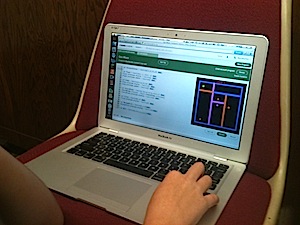 Riker W. of Troop 403 designed and programmed a single-player, top-down maze videogame with the progressively harder levels. The objective is to move the player to the green finish box while avoiding red enemies and other obstacles.
Using the arrow keys, the player moves to the green finish box in each level. The player dies if it touches a red enemy; when the player dies, the level is restarted. Colored walls can only be passed through while the player is the same color as the wall; the player can change his color moving the into a Color Changer of that same color. The player wins by completing all levels.
Playtesters enjoyed this game, but the designer found that it was unnecessarily complicated to have each Color Changer feature cycle through colors and instead decided to have each Color Changer remain a constant color.
Shooter
 Sungbin C. of Troop 1 designed and programmed a single-player (with two-player option), top-down shooter videogame in which the object was to defeat enemies while reaching each level’s final destination.
The game starts when the player presses the start button after choosing his weapon type. During the game, the player has a limited amount of health, armor, and shield that will decrease upon impact with enemy projectiles; , however, these regenerate over time. The player uses W, A, S, D to move and space bar to shoot (in a two-player game, the other player uses arrow keys to move with enter button to shoot). The controls may be rebinded. The game ends by one player running out of health, which will bring them to another level or back to loadout-choosing page, where they can re-choose loadout, depending on the settings.
Playtesters enjoyed playing this game and didn’t have suggestions for changes or improvements. However, the designer thought that some of the buttons on the weapon selection page were too small, and increased their size for the final playtest session.
All in all, it was a great Midway. I was able to sign off six Game Design Merit Badges as completed, as well as three partial completes (these were last-minute additions to my workshop who weren’t able to bring a game prototype with them, but did get credit for learning about game terms, game jobs and the use of intellectual property during the lecture portion of the workshop).






 David Mullich